How to Make a Website with Squarespace: Step-by-Step Guide
Disclosure: Some links in this guide are affiliate links. If you buy through them we may earn a commission, at no extra cost to you. We only link to tools we use in the guide. How we make money.
On this page
The short answer
- What you'll build
- A small business website made from a Squarespace template, with your own site title, text, page menu and search settings.
- Time
- About 1 hour
- Cost
- Free to build for 14 days. Publishing needs a paid plan: Basic was listed at A$17 a month, paid annually, on squarespace.com/pricing on 17 October 2026.
What you'll need
- A Squarespace account Free to sign up. Each new site gets a 14-day trial; Squarespace's pricing page said no credit card was needed to start.
- Your text and photos Your business name, a few lines about what you do and how to reach you. The template's photos are fine to start with.
- A paid plan to go live Squarespace has no free plan. You can build during the trial, but making the site public needs a subscription.
- Your own domain (optional) Annual plans include a free custom domain for the first year. Squarespace also sells .com.au domains.
Squarespace is a website builder known for polished, design-led templates, with hosting included. It suits small businesses, portfolios and creatives who want a site that looks good with little design work. There’s no free plan, but you can build for 14 days before you pay.
We worked through every step in a real Squarespace account on the trial, building a made-up cafe from the Vance template, and took every screenshot from it.
Step by step
-
Step 1: Start a new website
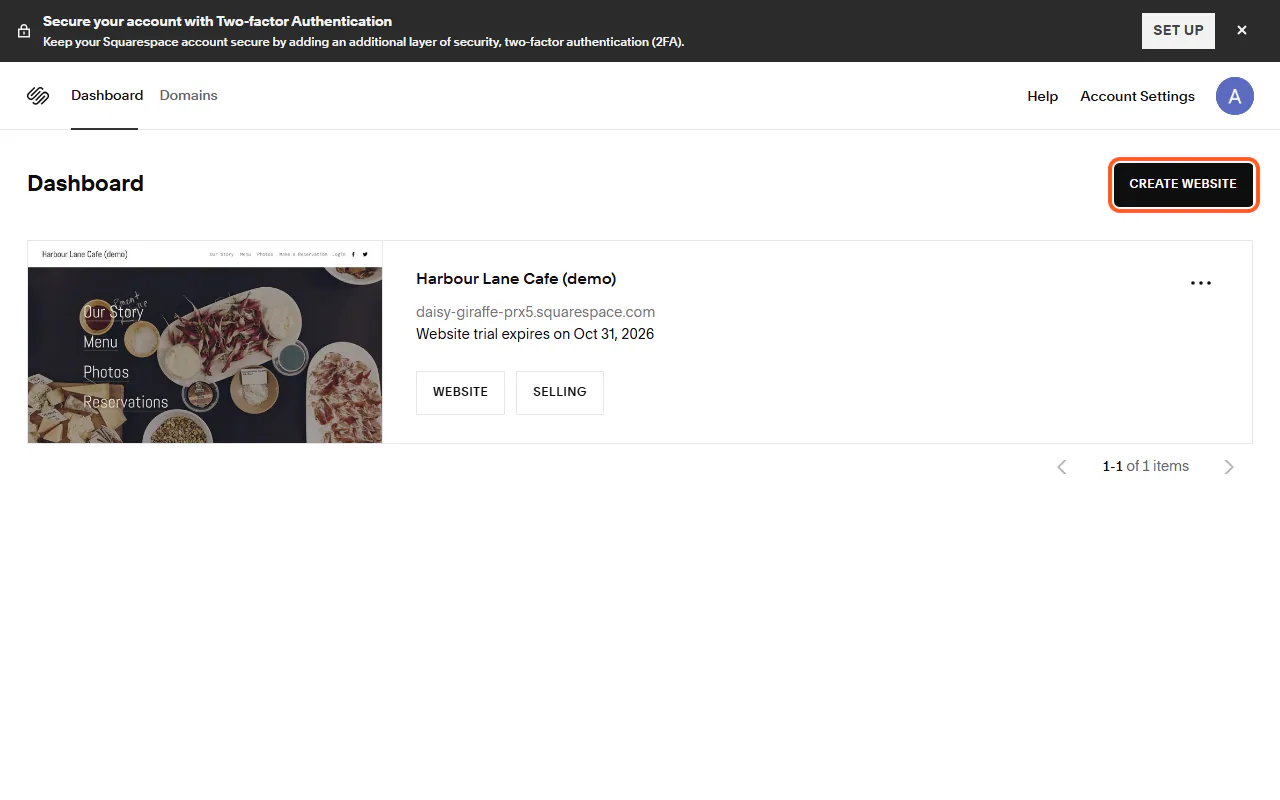
Log in at squarespace.com to open your account dashboard and click Create Website.
Your 14-day trial starts when the site is created, and the dashboard shows the date it ends. Have your text and photos ready so you can make the most of it.
-
Step 2: Tell Squarespace what your site is about
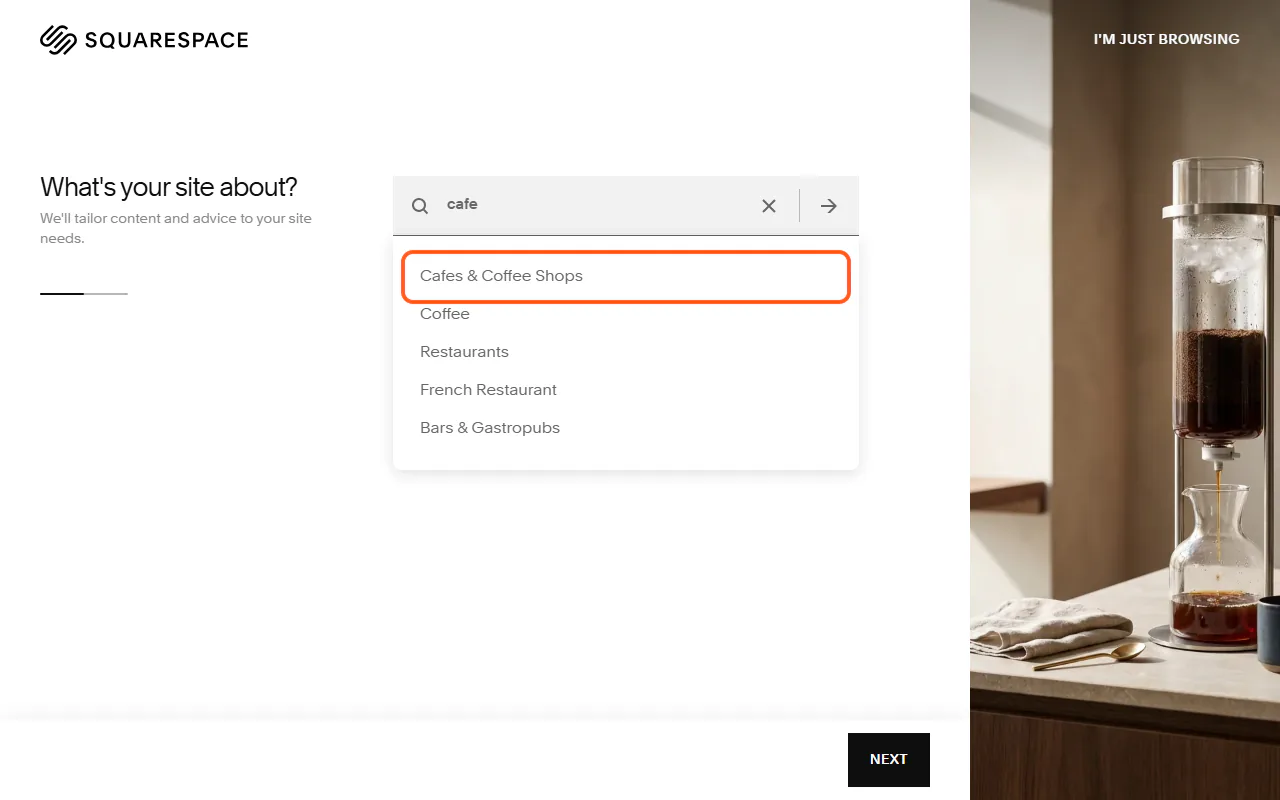
Type your topic in "What's your site about?" and pick the closest match. We typed "cafe" and chose Cafes & Coffee Shops.
Next, tick what you want the site to do (we chose Promote a physical business and Offer a contact form) and click Next. On "How would you like to get started?", choose Choose a Template. The other option, AI Website Builder, has Squarespace's Blueprint AI build a starting point for you.
-
Step 3: Pick a template
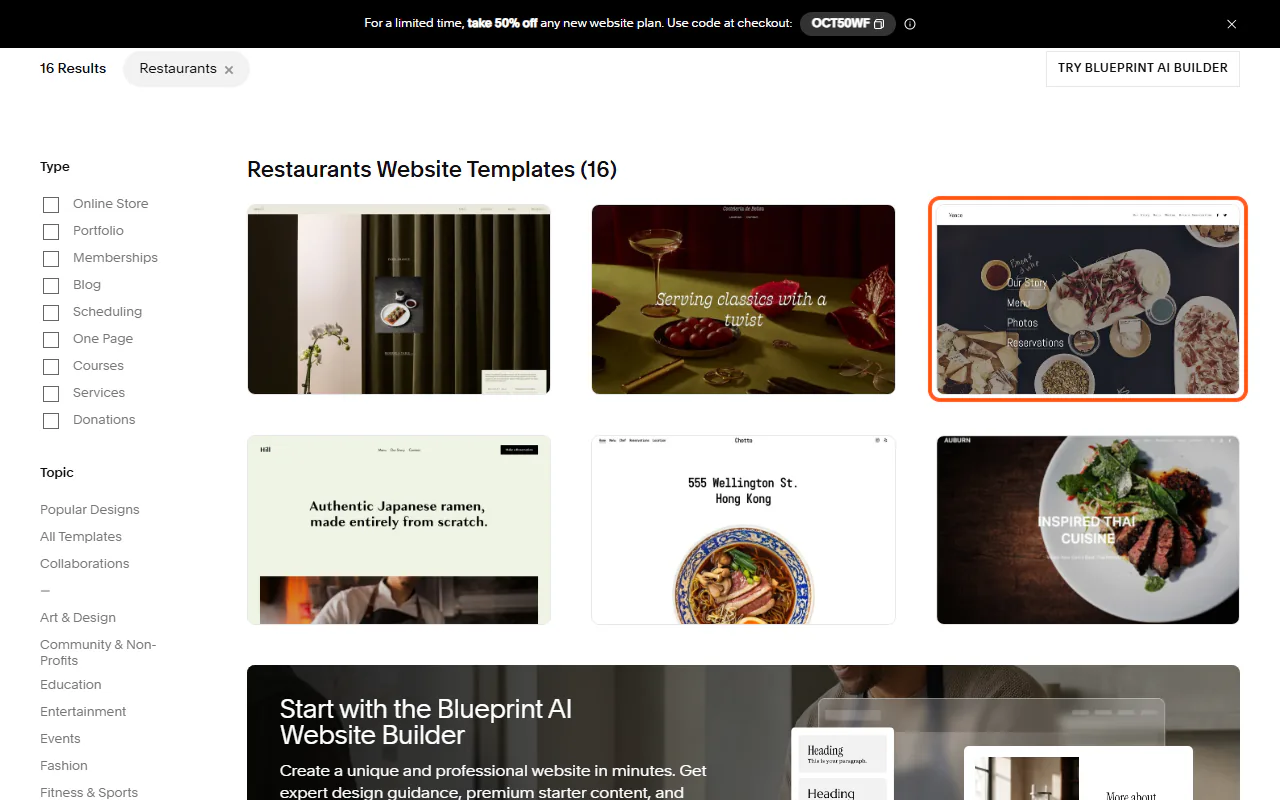
Squarespace shows templates for your topic: 16 restaurant templates for us. Scroll past the "Templates made for you" row to see them, and click one to look closer.
We picked Vance, which came with pages for Our Story, Menu, Photos and Make a Reservation.
-
Step 4: Start with the design
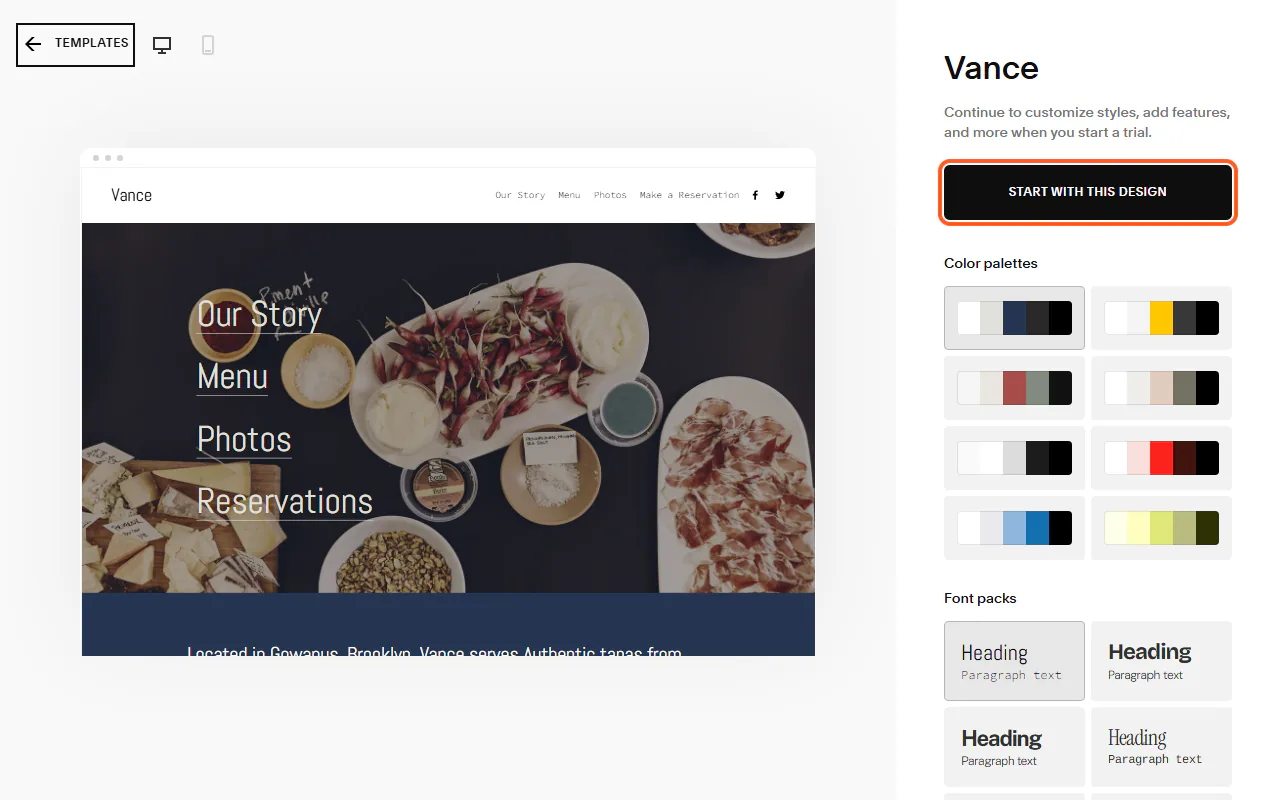
The template page shows a preview with its colour palettes and font packs on the right. You can change these later, so don't spend long here.
Click Start with this design. Squarespace creates your site and opens its dashboard.
-
Step 5: Add your site title and logo
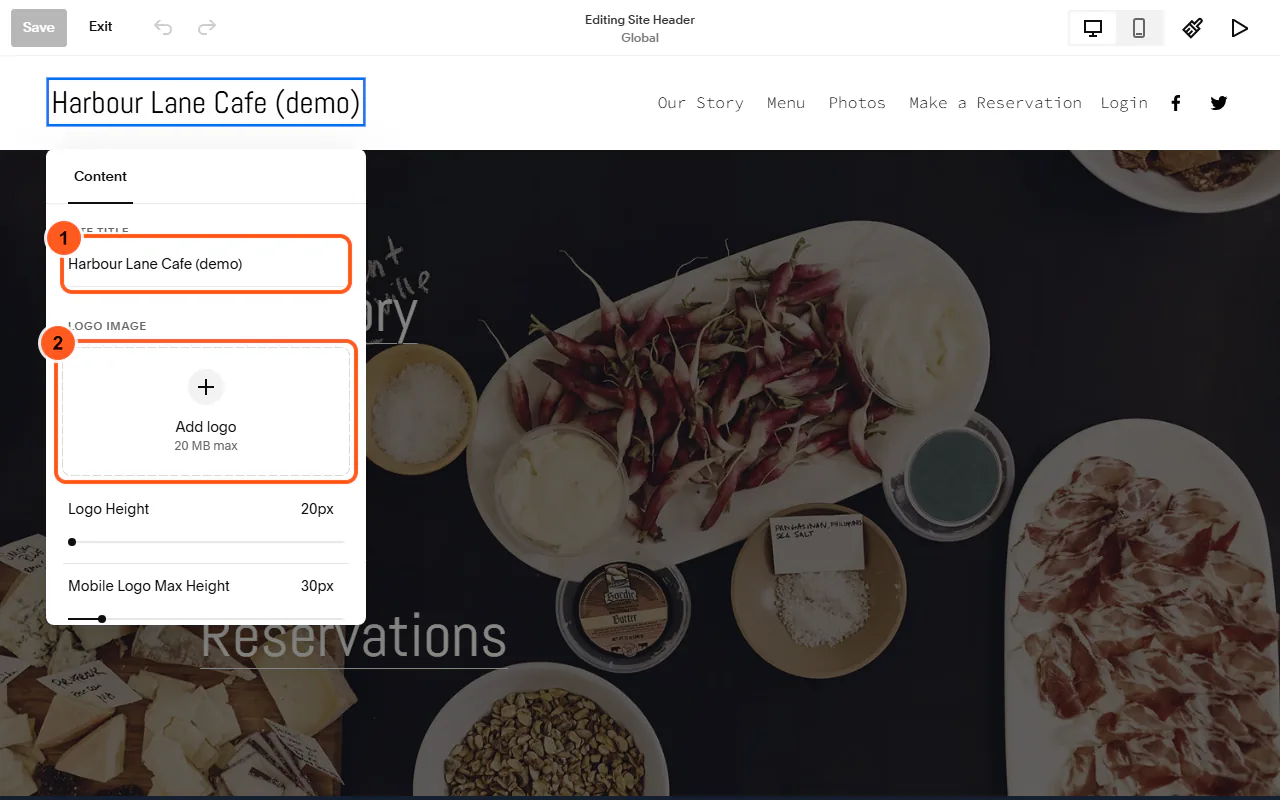
Click Edit Site, then Edit at the top left of the page. Click the header, then the site title ("Your Site Title" to start), then the pencil beside it.
Type your business name in Site Title. If you have a logo, add it under Logo Image. Click Save at the top left.
-
Step 6: Replace the sample text
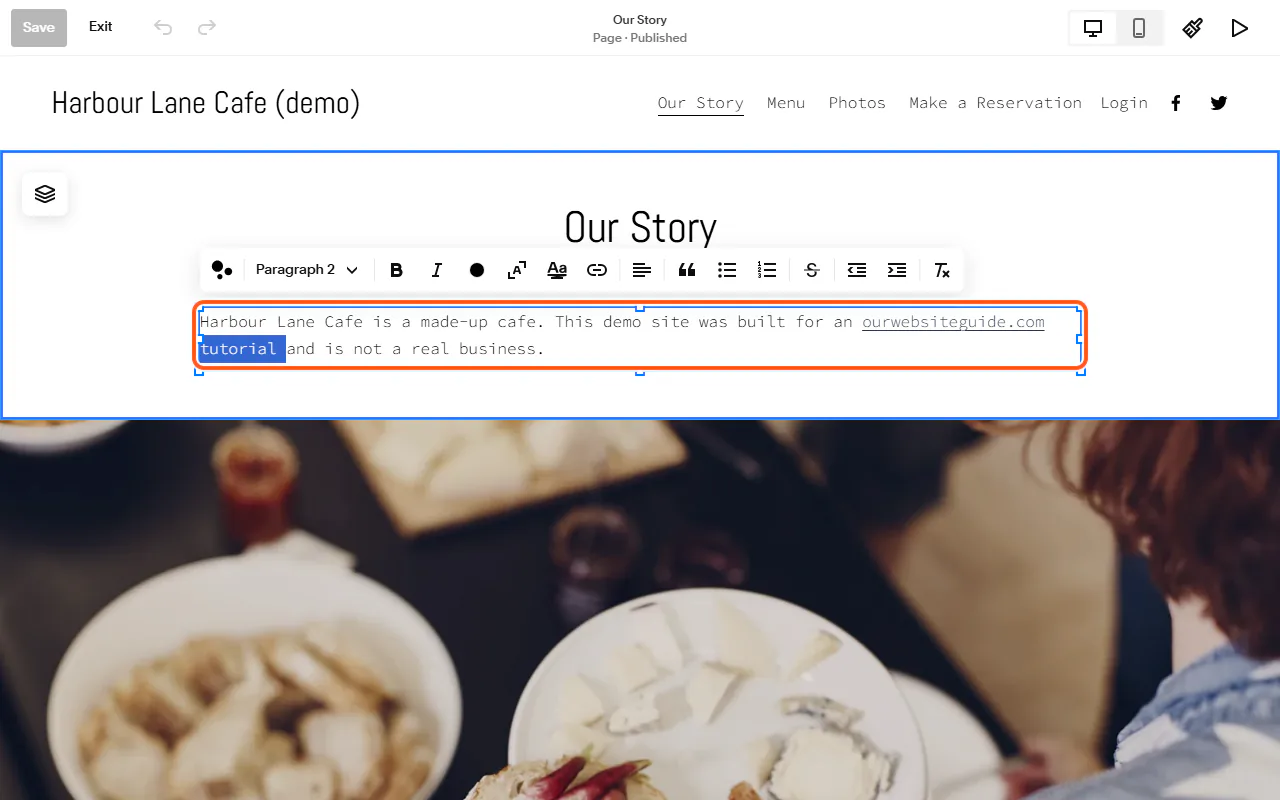
Open a page (we used Our Story), click Edit, then double-click any text to change it. A toolbar appears for headings, bold, links and lists. Click Save when you're done, then Exit.
Templates are full of placeholder words, and the footer has a sample address, email and phone number. Replace all of it on every page before you publish.
-
Step 7: Set up your pages
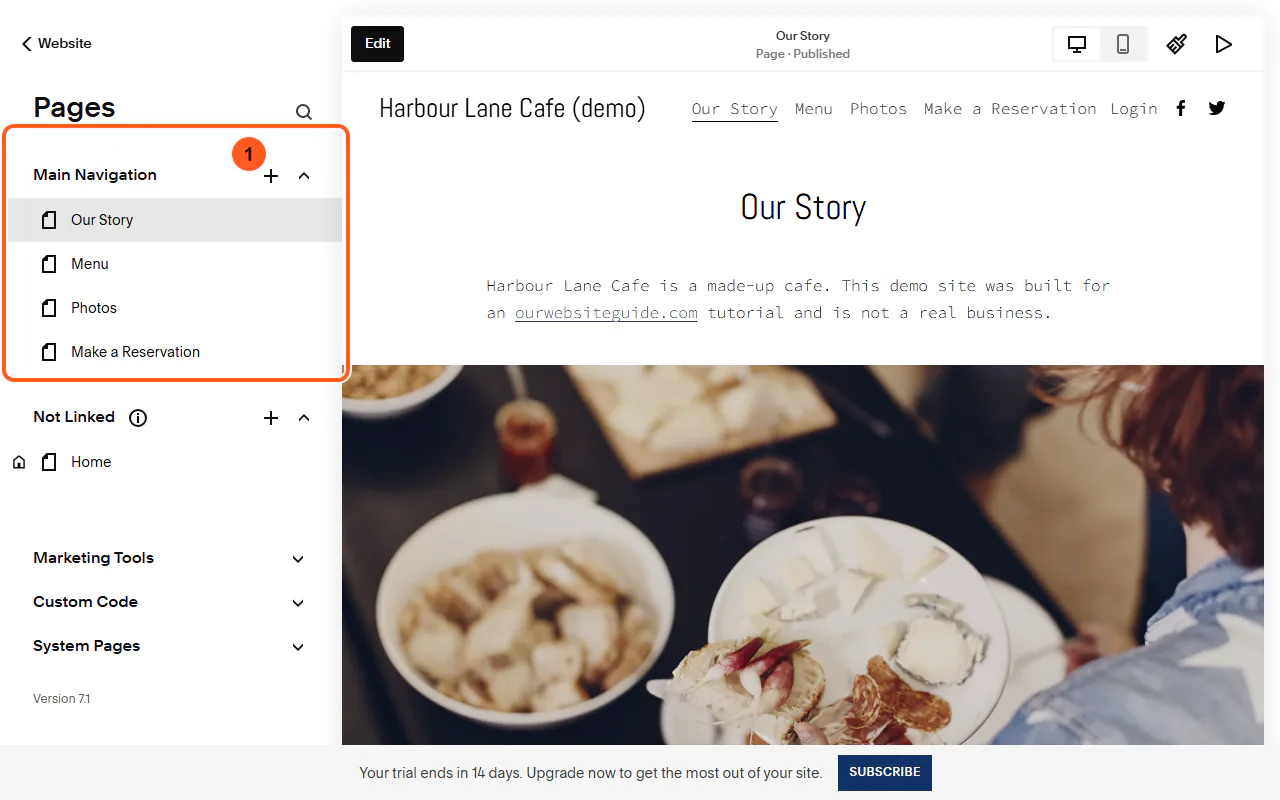
In the dashboard, open Website, then Pages. Pages under Main Navigation appear in your site's menu. Not Linked pages aren't in the menu; our Home page sat there, marked with a house icon as the homepage.
Click + to add a page. Hover over a page to show its bin icon (to delete it) and its cog (page settings). Delete the template pages you won't use: we wouldn't keep Menu or Make a Reservation without a real menu and booking system.
-
Step 8: Check the mobile view
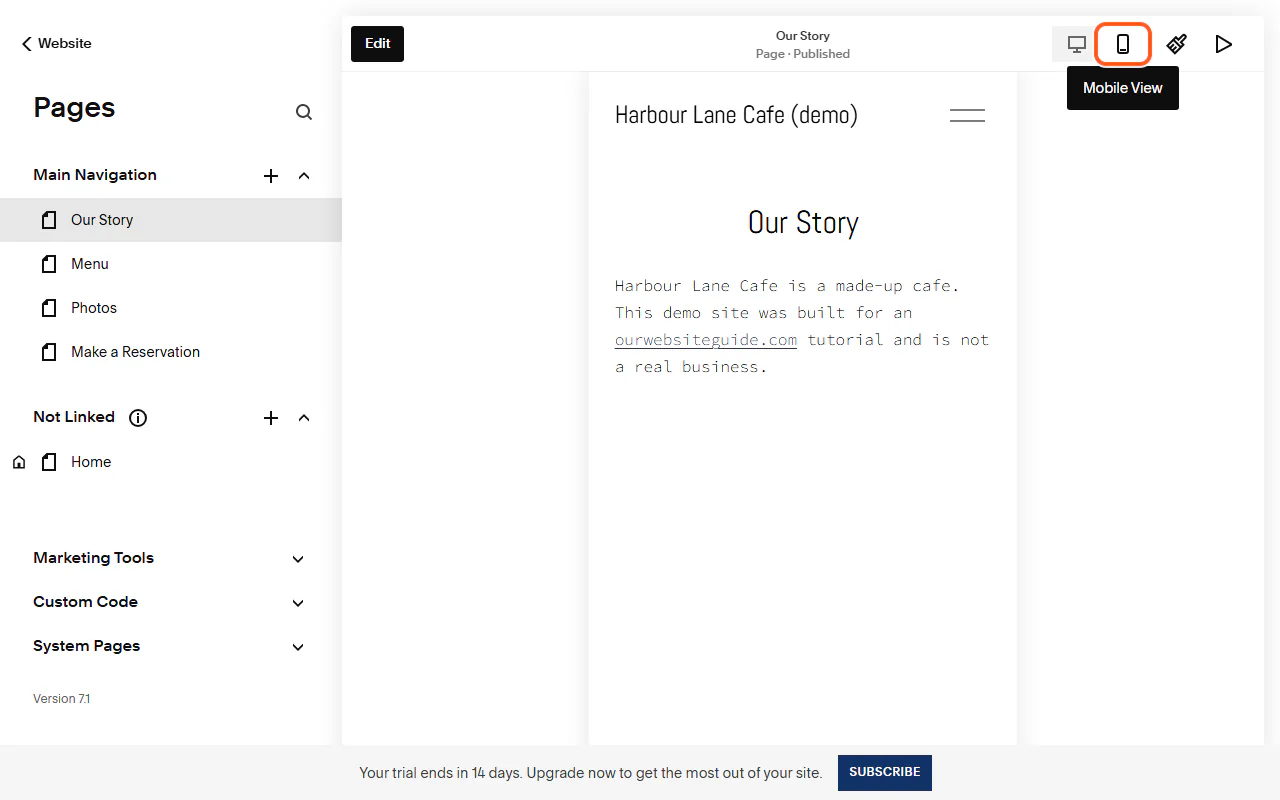
Click the phone icon above the page preview to see your site at phone size. The menu folds into a menu button.
Go through each page and fix anything that looks too big, too small or out of order.
-
Step 9: Get your site ready for Google
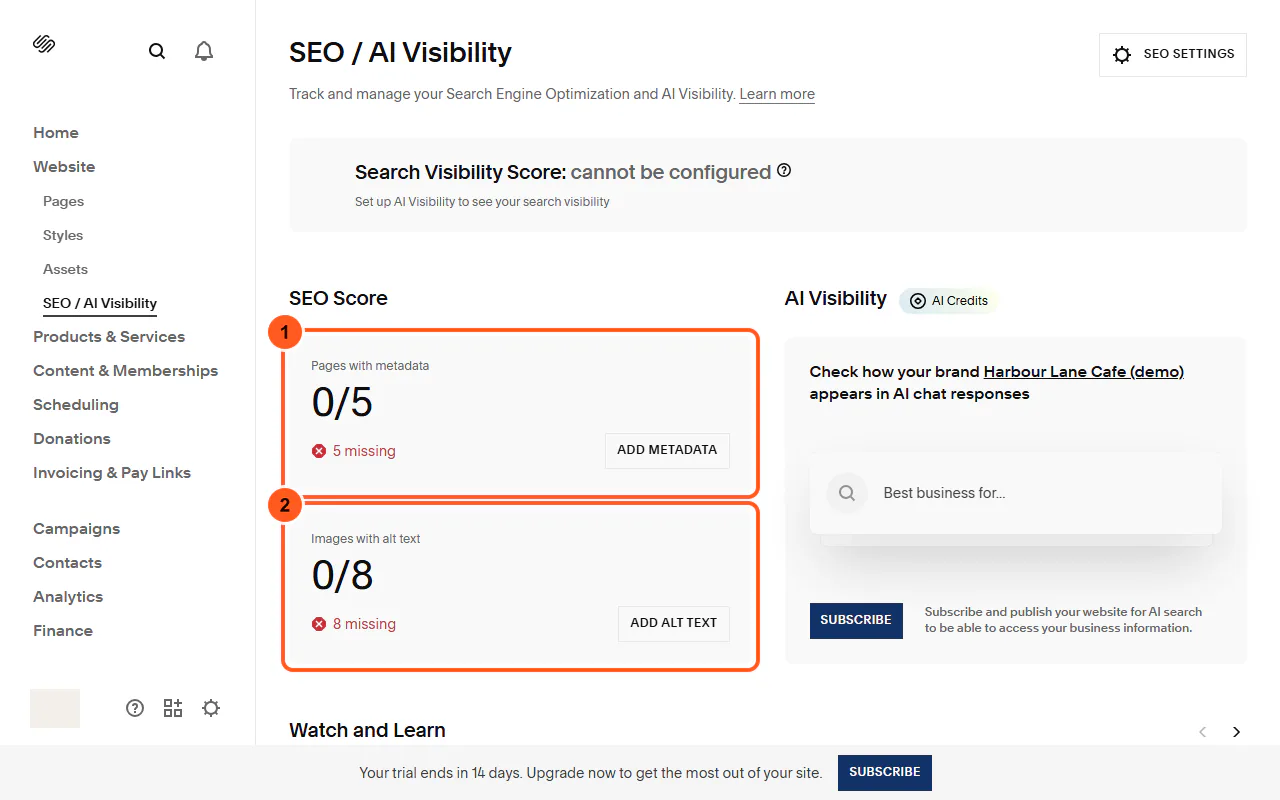
Open Website, then SEO / AI Visibility. Our new site scored 0 of 5 pages with metadata and 0 of 8 images with alt text.
Click Add Metadata to give each page a title and description for search results, and Add Alt Text to describe each image for people using screen readers and for search engines.
-
Step 10: Choose a domain
Your trial site has a temporary address ending in .squarespace.com (ours was made of random words). For a real business, use your own domain.
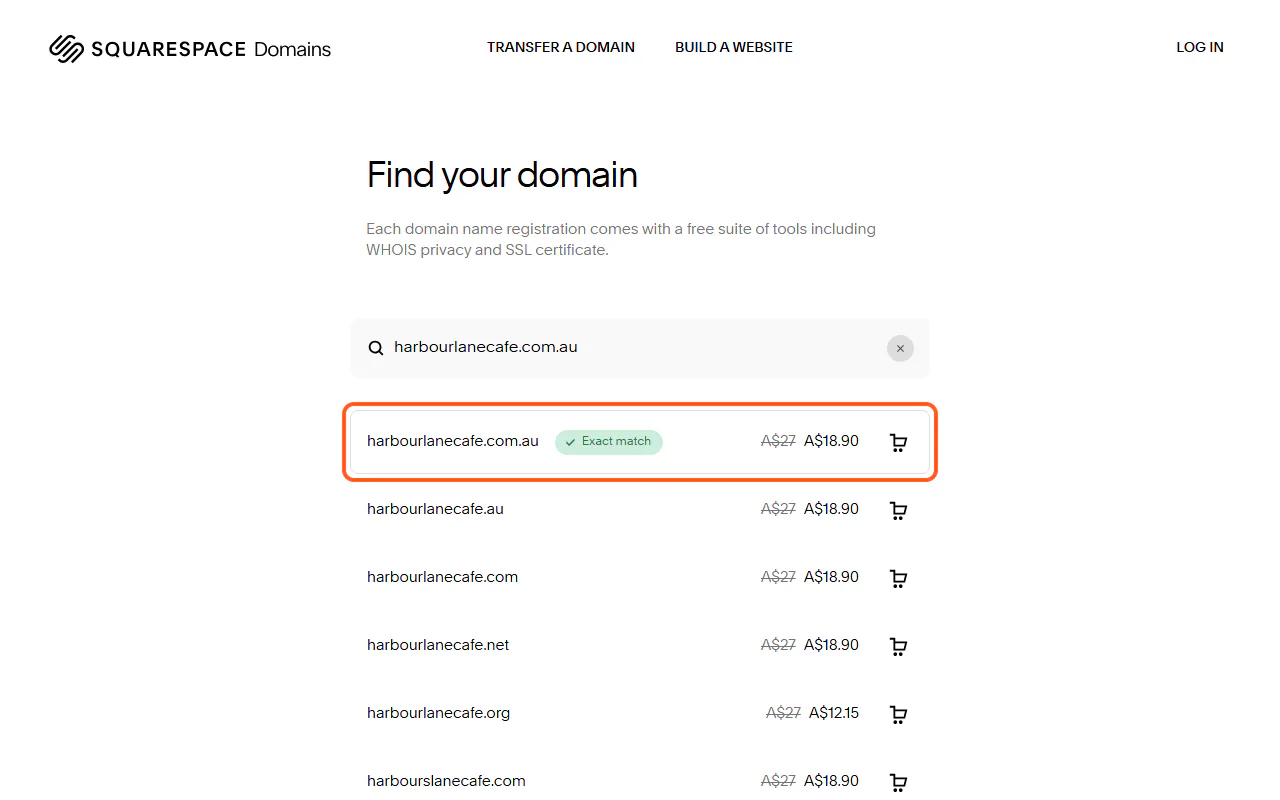
Annual plans include a free custom domain for the first year. When we searched, Squarespace offered harbourlanecafe.com.au with a regular price of A$27 and a discounted price of A$18.90. To register a .com.au you need an ABN or another Australian connection. You can also connect a domain you already own.
-
Step 11: Publish your site
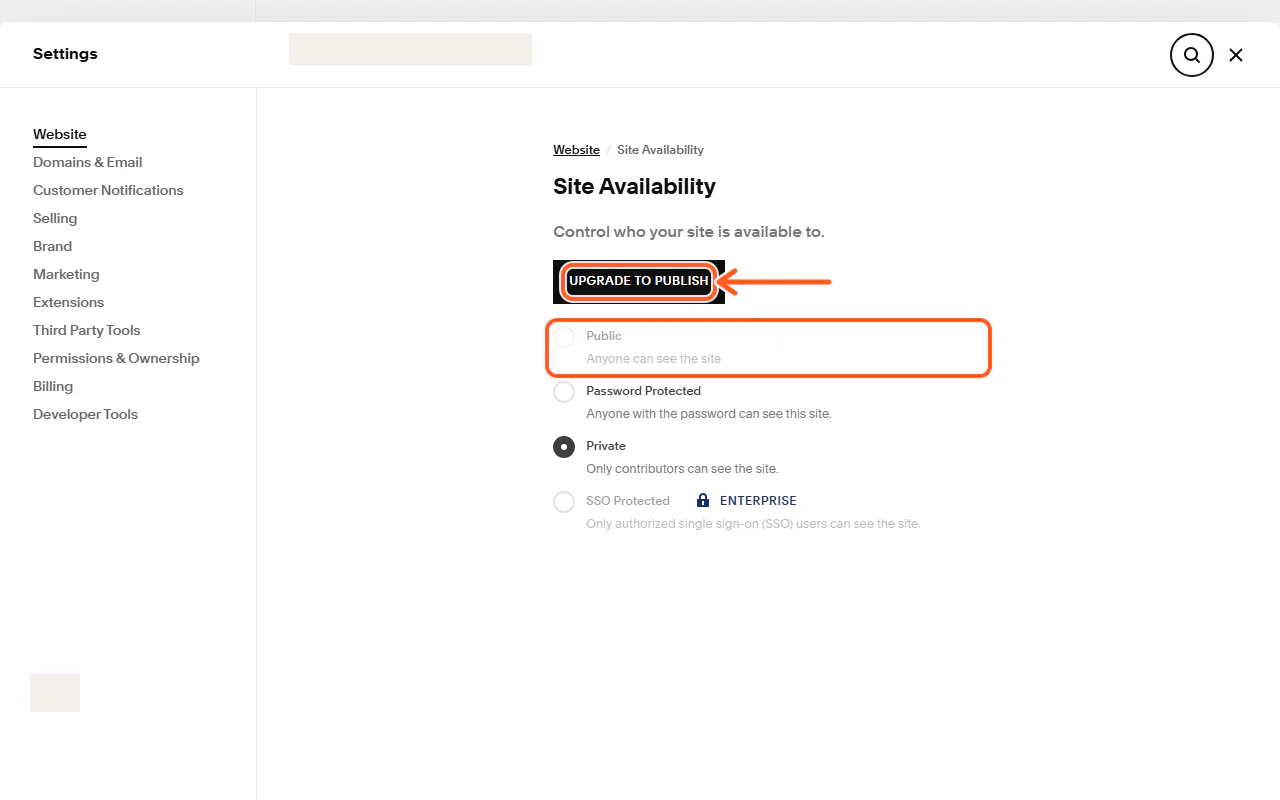
New sites start as Private: only you can see them. To go live, open Settings, then Website, then Site Availability. During the trial the Public option is greyed out and Squarespace shows Upgrade to Publish.
Choose a plan, then set Site Availability to Public. We stopped here: our made-up demo cafe isn't a real business, so we didn't subscribe or publish it.
Comparison
| Plan | Price | What you get |
|---|---|---|
| Basic | A$17 | Templates and AI tools, free custom domain for the first year, up to 2 contributors. 2% transaction fee on online store sales. |
| Core | A$28 | Unlimited contributors, advanced analytics, CSS and JavaScript customisation. 0% online store transaction fee. |
| Plus | A$49 | Lower card rates (from 1.6% + A$0.30) and more selling tools. |
| Advanced | A$109 | Squarespace's lowest payment fees and its most advanced commerce tools. |
Troubleshooting
I can't make my site public
On the trial, the Public option in Settings, Website, Site Availability is greyed out. Subscribe to a plan first, then set it to Public.
My trial is about to run out
The account dashboard shows the date each site's trial ends. Subscribe before then to keep the site.
Visitors see sample addresses or text
Check every page and the footer (Edit, then click the footer) for the template's placeholder words, addresses, emails and phone numbers.
My page doesn't look right on phones
Click the phone icon above the page preview and adjust the page in the mobile view.
Frequently asked questions
Is Squarespace free?
No. You can build a site free for 14 days, but publishing needs a paid plan. Basic was listed at A$17 a month, paid annually, on 17 October 2026.
Can I use a .com.au domain with Squarespace?
Yes. Squarespace's domain search offered .com.au names when we checked. You need an ABN or another Australian connection to register one. You can also connect a .com.au you already own.
Are Squarespace prices in Australian dollars?
Yes, squarespace.com/pricing showed prices in AUD. The page didn't say whether GST was included, so check the total at checkout.
Do I need a credit card for the trial?
Squarespace's pricing page said no credit card was required to start the free trial.
Should I use a template or the AI Website Builder?
Either works. A template gives you a tested layout to fill in; Blueprint AI builds a starting point from your answers. Whichever you choose, replace every piece of sample text before you publish.